


Windfinder Pro: Wind & Weather
4.7291.00 Reviews
App Specs
- Version
- 3.39.3
- Updated On
- License
- $12.99
- Downloads
- 100,000+
- Developer
- Windfinder
- Categories
- Weather
- Platform
- Android, iOS
Screenshots
 Analysis by AppCompare
Have you ever been caught in a sudden windstorm while trying to enjoy a day at the beach or sailing on your boat? I sure have, and it's not exactly a pleasant experience. That's where Windfinder Pro: Wind & Weather comes in handy. This app is like having your own personal meteorologist in your pocket, and trust me, it's a game-changer for anyone who spends a lot of time outdoors.
Why Windfinder Pro Stands Out
So, here's the deal. Windfinder Pro: Wind & Weather isn't just your average weather app. It's designed specifically for those who need detailed information about wind conditions, whether you're a sailor, surfer, kiteboarder, or just someone who loves a good stroll on a windy day.
One of the first things I noticed after downloading the app was its sleek and user-friendly interface. It’s pretty intuitive, which means you won't be fumbling around trying to find the information you need while your kiteboard is flying off without you. The app provides forecasts for over 45,000 locations worldwide, so you're covered no matter where your adventures take you.
Forecasts for Planning, Not Just Checking the Sky
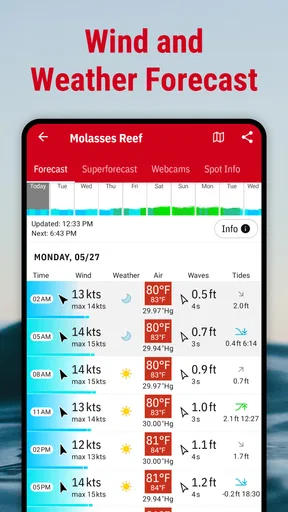
Let’s dive into some of the features that really make Windfinder Pro a must-have. First off, you get hourly forecasts up to 10 days in advance. This is perfect for planning those long weekends away. You’ll know exactly what kind of weather to expect, and you can pack accordingly.
But wait, there’s more! The app offers detailed wind forecasts, including wind speed and direction, gusts, and even the wind’s exact location. If you’re into water sports, you’ll appreciate the wave forecast feature, which gives you information about wave height, direction, and period.
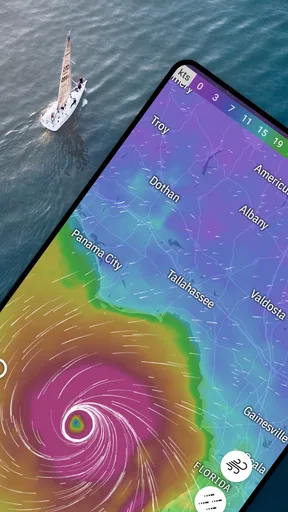
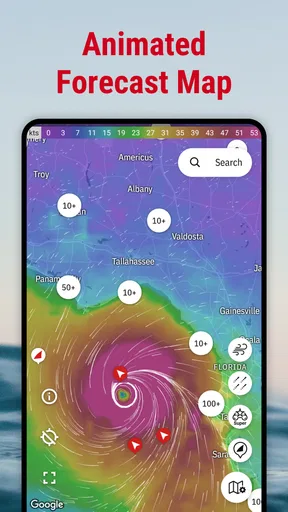
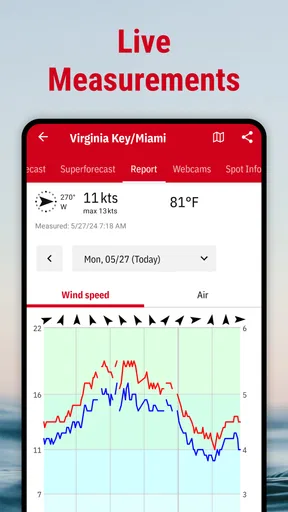
One of my personal favorite features is the real-time weather data. This includes current wind conditions, air temperature, and even cloud coverage. It’s like having a mini weather station in your pocket. And for those moments when you need to see it to believe it, there's a handy map view that shows live wind conditions. You can literally see the wind patterns right on your screen. How cool is that?
The longer outlook is most useful as a planning aid, not a promise. I use it to compare possible days, then check again closer to leaving before committing to a trip. Wind can shift, and a forecast several days out is better at helping me choose a window than guaranteeing what a specific beach or launch point will feel like. For a high-stakes outing, I would treat the app as one input alongside local knowledge and an on-the-day check.
Worth Reading Before You Choose

EA SPORTS FC Mobile 26 Is a Bigger Football Game, but It Takes Time

Flipboard Shows What News Apps Must Do Beyond the Feed

Switching to Android Auto Means Rethinking Your Driving Routine

Google Calendar Makes a Crowded Week Easier to Manage

Ludo King Makes the Most of the Minutes Between Plans

Baby Panda World Brings Quick Play to Modern Phones, but Its Game Library Feels Busy
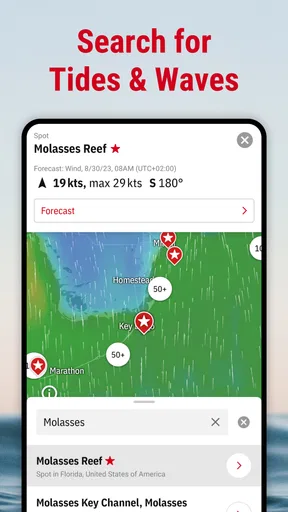
A practical workflow is to save the places I actually visit rather than repeatedly searching a broad area. Then I can compare a familiar shore with a backup spot and ask a more useful question than “Will it be windy?”: will the wind direction and gusts suit the activity at either location? That distinction matters for sailing and kite sports, where a decent average can still hide uncomfortable or unsuitable bursts.
Alerts Help, but They Don’t Make the Decision for You
Alright, I have to talk about the custom alerts because they are a lifesaver. You can set up notifications based on your specific needs, like when the wind reaches a certain speed or changes direction. This means you’ll never be caught off guard again. Imagine getting a heads-up before a sudden gust ruins your perfectly planned day on the water.
These alerts can be customized for different locations as well, so whether you're planning a beach day or heading out for a hike, you can get the precise info you need. It's like having a personal assistant who only cares about the weather.
I’d set an alert around a decision I can act on, such as a wind change that could affect a planned session, rather than creating notifications for every small fluctuation. Too many alerts quickly become background noise. A notification is a prompt to reopen the forecast and reassess, not a safety guarantee; conditions at the exact spot can differ from what a forecast location represents, and outdoor plans still need common sense.
This is also where the app fits neatly into an ordinary day. If I’m considering a beach visit after work, I can check the likely wind and gusts before packing, then use an alert as a reminder to revisit the conditions later. If the forecast looks uncomfortable, I can switch to a sheltered walk or postpone the outing instead of arriving with the wrong expectations. That is a small but genuinely useful way to get value from a wind-focused tool even when I’m not planning a full day of sport.
Useful Extras, with a Few Trade-Offs
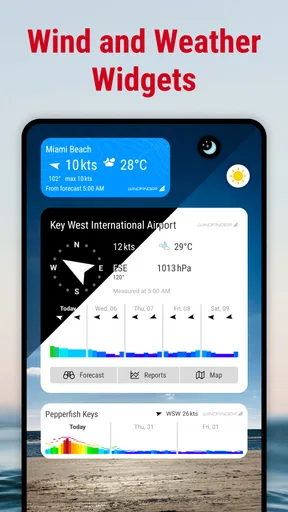
Another thing I love about Windfinder Pro is that it offers an ad-free experience. Let’s be real, no one likes pop-ups or ads interrupting their day, especially when you're trying to check crucial weather updates. Plus, the app comes with widgets and an Apple Watch extension, making it even more convenient to get the latest weather updates at a glance.
For data nerds out there, the app allows you to analyze historical weather data, which is pretty awesome if you're trying to identify patterns or just want a deeper understanding of weather trends.
The historical view has a different kind of value from the forecast: it can help me think about how a location tends to behave, rather than answer what will happen on a particular afternoon. If I’m choosing between familiar spots for a future outing, past patterns can provide useful context. I wouldn’t use that history as a substitute for the current forecast, though; unusual weather is precisely when relying on what usually happens can lead me astray.
Windfinder is a specialist rather than a complete replacement for every weather app. A general forecast app is often quicker if I only want a simple temperature check or a broad chance of rain. Here, the advantage is the extra attention to wind details and, for water activities, waves. The trade-off is that someone who rarely cares about wind may find the more focused information unnecessary and prefer a simpler everyday forecast.
There is also a cost decision to make. The app is listed at $12.99, with in-app purchases ranging from $0.99 to $9.49 per item. I’d weigh that against how often I plan around wind: for someone who sails, surfs, or kites regularly, checking conditions is part of the activity, so detailed information can earn its place. For someone who checks the weather only occasionally before a casual walk, paying for a dedicated tool may be harder to justify. I would check the current purchase options in the app before deciding what is relevant to my use.
Who I’d Recommend It To
Windfinder is made by Windfinder, and it sits in the weather category with a 4.7 average from around 15,000 ratings. It has over 100,000 installs, carries an Everyone age rating, and its current version is 3.39.0; it was released on June 15, 2010, and requires OS 7.0 or later. Those details make it a familiar, established option, but they don’t tell me whether its specialist approach suits a particular person. That comes down to how often wind affects your plans.
I’d recommend it most to people who make repeated decisions around wind: sailors comparing a departure window, surfers checking whether a session is worth the drive, kiteboarders watching for a workable change, and anglers or hikers who want more than a general forecast. It can also help a group coordinate: everyone can check the same saved location and discuss whether the conditions look worth travelling for, instead of relying on one person’s impression of the sky.
It is less compelling if your main need is a simple daily summary, or if you rarely plan activities outdoors. A general weather app may be faster for checking whether to carry an umbrella, while a local source may be more useful when you need advice tied closely to one specific launch or stretch of coast. I see Windfinder as a strong planning companion, not an automatic authority over local conditions.
My Final Take
All in all, Windfinder Pro: Wind & Weather is a solid choice for anyone who needs reliable and detailed weather information. Whether you're a seasoned sailor or just someone who wants to enjoy a sunny day without surprises, this app has got you covered. The combination of detailed forecasts, real-time data, and customizable alerts makes it a standout in the crowded world of weather apps.
If you haven’t already, I’d highly recommend giving Windfinder Pro a try. It's a small investment for peace of mind and a smoother experience outdoors. Happy adventuring!
My recommendation comes with one important qualification: don’t treat any forecast as certainty, especially when a decision affects safety on the water. Use the app to compare locations, notice changes, and plan a sensible backup; check conditions again before setting out and follow local guidance. For people whose plans genuinely depend on wind, that focused approach is the reason to choose it. For everyone else, a basic forecast may be enough.
Pros
- Accurate wind forecasts for various activities.
- Global coverage with detailed local insights.
- User-friendly interface with intuitive design.
- Customizable notifications for weather updates.
- Ad-free experience enhances usability.
Cons
- No free trial available for premium features.
- Some users report occasional loading delays.
- Requires internet connection for updates.
- Limited offline functionality for remote areas.
- Subscription model might not suit casual users.
FAQs for Windfinder Pro: Wind & Weather
What is Windfinder Pro: Wind & Weather?
Windfinder Pro is a comprehensive app designed to provide detailed wind, weather, and wave forecasts for various outdoor activities. Whether you're into sailing, surfing, or paragliding, the app offers real-time data and predictions to help you plan your adventures. It’s available on both Android and iOS, making it accessible for most users.
How accurate are the forecasts provided by Windfinder Pro?
Windfinder Pro uses reliable data from over 20,000 weather stations worldwide to ensure accuracy. The app provides forecasts up to 10 days in advance and updates regularly to reflect current conditions. While no weather forecast can be 100% accurate, users generally find Windfinder Pro to be reliable and consistent for planning outdoor activities.
What features does Windfinder Pro offer that are not available in the free version?
The Pro version of Windfinder offers several enhanced features, including ad-free usage, hourly forecasts, and a wind preview feature. Additionally, it provides access to Superforecast, which delivers high-resolution weather data for select regions, and the ability to personalize your experience with customizable widgets and alerts.
Is Windfinder Pro user-friendly for beginners?
Yes, Windfinder Pro is designed with user-friendliness in mind. The app features an intuitive interface that simplifies the navigation of its comprehensive data. Beginners can easily access basic forecasts, while more experienced users can dive into detailed analytics. The app also includes tutorials and support to assist new users.
Does Windfinder Pro require an internet connection to function?
While Windfinder Pro does require an internet connection to download the latest forecasts and updates, it allows users to save favorite locations for offline access. This feature is particularly useful for travelers and outdoor enthusiasts who may find themselves without connectivity in remote areas.


